Wednesday, November 12, 2014
Samsung Galaxy Star S5282 Hard Reset
Hard Reset:
Press and hold Volume UP + Home + Power Key Until Samsung logo Appear
Now you see android recovery logo
Now select Wipe data/factory reset and press home key to confirm
Now select Yes -- Delete all user data and press home key to confirm
Now reboot device
hard reset done
One Another Hard Reset Solution:
Download tool and file and Drivers
Put Phone in Download Mode
Press and hold Volume Down + Home + Power key
now press Volume Up for enter Download Mode
Connect phone to PC install Drivers and open tool
Select CSC file and Start flashing
After write CSC file phone will Reboot automatic
hard reset done

Saturday, November 8, 2014
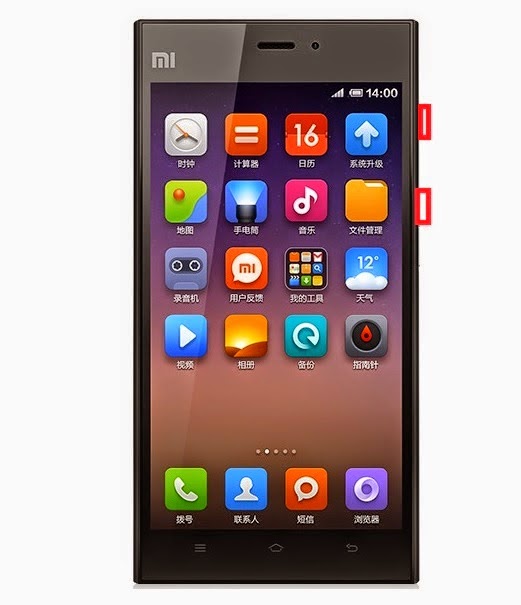
Xiaomi mi3 Hard reset Pattern lock remove Solutions
You Can Apply Hard Reset In Many Cases We Will Tell You Some Example
- Forgotten Pattern Lock
- Forgotten Phone Lock
- Forgotten User Code
- If Your Phone Seems Frozen Due To Any Cases.
How to Hard Reset Your xiomi mi3
* Please maintain Battory Charge above 60%
* Switch Off Your Device
* Press And Hold Volume Up Key + Power key
* Release All Keys When you See mi Logo
* Select English language in Mi Recovery menu
* Now You See Many Options
* Reboot
* Wipe & Reset
* Install Update.Zip to System
* Power Off
* Select Wipe & Reset By using Volume Key. Confirm Using Power key
* Now You See some another options
* Wipe Cache
* Wipe all data
* Wipe SD Data
* Back to main menu
* Select Wipe all data and confirm
* Then Select Yes
* Wait Some Minutes . Your Phone Will be Restarted After Completing The Hard Reset Prosses
* Enjoy !
Thursday, November 6, 2014
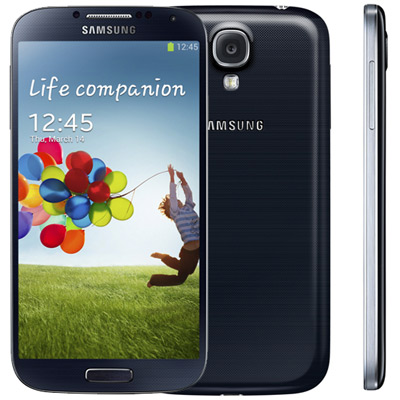
Samsung Galaxy S 4 Hard Reset i9500
Samsung Galaxy S 4 Hard Reset i9500
1. Switch Off Your Phone
2. Press and hold Home Button + Volume Up + power on button
3. Wait for 5 second until Android System Recovery menu appear
4. There are Many options
* Reboot System Now
* Apply Update from Sd card
* Wipe data/factory reset
* wipe cache partition
5. Move the Selection to " Wipe data / factory reset " using volume down ( - ) button and menu button to confirm, Then Conform It because the touchscreen doesnt work in recovery mode
6. Then Choose Reboot System Now
7. After the process done, phone will reboot. or Go to dial pad and type *2767*3855#
Wednesday, October 29, 2014
How to Hard Reset LG GT540
(Warning! When you do a full reset, your LG Smartphone returns to its default settings and looses all data that is stored in your phone. Do not forget to back up any important data before performing a factory reset.)
To perform a hard reset follow this easy steps
1) Power on your phone.
2) Press volume up button + home button + search button at the same time for 5 seconds
(see the image below for the buttons location)
3) A message will appear " Are you sure you want to factory reset?"
5) Press yes and wait for phone to restart.
6) Youve done resetting your GT540.
Sunday, October 5, 2014
Samsung Galaxy S I9000 hard reset

Thursday, October 2, 2014
Samsung Galaxy Premier Hard Reset Instructions
Samsung Galaxy Premier I9260 Hard Reset Instructions / Guide:
- First, you must Enter *2767*3855#
- Dont forget backup all your data including contacts, messages etc because will be lost! Copy all your necessary data/Contacts/Messages etc. to SIM or make backup to your PC before full reset! Take out SIM card before full reset.
While to Unlock Galaxy Premier using hard reset: PRESS AND HOLD VOLUME UP + Home Button + Power
- Turn the phone off.
- Press and hold VOLUME UP and Home(center) button
- Press Power until the phone vibrate
- Wait until you see the Android logo then release all the buttons.
- Select Wipe data/Factory reset with VOLUME DOWN, press Power (right hand-side)
- Select YES -- delete all user data with VOLUME DOWN and then press Power
- After format, press Power again to reboot phone. (select reboot system now)
Friday, September 26, 2014
Htc One hard reset
If you forgot your Lcd lock combination or password follow these steps.
Warning! All data will be lost!
1.Press together volume down + power button
2.Keep press untill recovery menu appears
3.Choose with volume buutons "factory reset" and select it with power button
4.Wait until phone restarts
How to Hard Reset for Samsung Rex 70 S3802
Actually, instructions or guide about how to hard reset for Samsung Rex 70 S3802 have the same process with Samsung Rex 60 C3312R phone. So, you can read here.
As we know it, the Samsung Rex 70 S3802 is dual sim phone that support for GSM network with frequency of 850 / 900 / 1800 / 1900. It has 3.0 inches, TFT touchscreen, with 240 x 320 pixels resolution. The phone has physical dimensions of 104.9 x 57.2 x 12 mm and equipped with 2 MP camera. The Samsung Rex 70 S3802 powered by Li-Ion 1000 mAh battery capacity also available 10 MB internal memory.
Thursday, September 25, 2014
Factory Reset Samsung Galaxy Young GT S6312

Monday, September 22, 2014
How to Factory Reset Hard Reset ZTE Avid 4G
1. On your device touch on Home.
2. Go to Apps, then Settings.
3. Select on Backup and reset.
4. Choose Factory data reset.
5. Touch on Reset phone. If you also want to remove all data saved to an installed micro SD, just tick the Erase SD card check box before touching Reset phone.
6. And lastly touch on Erase everything and just follow the prompt to complete the factory reset.
Follow the onLcd instructions to set up your phone again after the reset.
If your device is unresponsive, then you may need to Hard Reset. Press and hold on the Power button and Volume Up at the same time for a few seconds.
Thursday, September 18, 2014
Reset Samsung Galaxy Tab 8 9 SGH I957 to Restore Factory Settings

- From a Home Lcd, touch Apps ➔ Settings ➔ Privacy.
- Touch Factory data reset, then follow the prompts to perform the reset.
- Touch Reset device, then at the prompt, touch Erase everything.
Friday, September 12, 2014
Reset Gigabyte GSmart G1345 to Restore Initial Settings

- Tap Application Drawer > Settings > Privacy.
- Tap Factory data reset > Reset phone > Erase everything to reset the phone.
Wednesday, September 10, 2014
How To Hard Reset Samsung I9500 Fraser
Hard Reset Samsung I9500 Fraser

If your device freezes or hangs, you may need to close programs or reset the device to regain functionality.
If your device is frozen and unresponsive, press and hold the Power key for 10-15 seconds. The device will reboot automatically.
If this does not solve the problem, perform a factory data reset. In Idle mode, open the application list and select
Settings > Privacy > Factory data reset > Reset phone > Erase everything.
Select Settings > Privacy > Factory data reset: Reset your settings to the factory default values and delete all your data.
Press Application button, then Settings > Reset settings: Reset your settings to the factory default values.
While using your device, be sure to back up important data. When disposing of your device, back up all data and then reset your device to prevent misuse of your personal information.
Use this method to hard reset your Samsung I9500 Fraser :
Enter *2767*3855#.
Warning! All your data including contacts, messages etc. will be lost!
Copy all your necessary data/Contacts/Messages etc. to SIM or make backup to your PC before full reset! Take out SIM card before full reset.
Saturday, September 6, 2014
How To Reset Your Samsung Galaxy S3 gt I9300

- Switch Off Your Samsung Galaxy S3 gt-I9300
- Take Out Your Sim And Memmory Card
- Press And Hold Volume Up Key + Home Key + Then Power On Your Phone
- Hold Pressing Keys Untill The Second Logo Appears
- When Scond Logo . Release All Keys
- Then You Will Get Factory Reset Menu
- Select Wipe Data/ Factory Reset Option . Scroll Using Volume Key . Then Confirm Using Power Key
- By Select Yes Delete All User Data Using Volume Down Key . Press Power key to confirm.
- Wait Some Seconds. Then Select Reboot System Now Option And Confirm
- Now Your Phone Will Restarted. After Completing The Hard Reset Proses
- Done
Friday, September 5, 2014
Motorola Titanium Factory data reset
| Motorola Titanium Factory data reset |
Performing soft reset and factory data reset ( master reset or hard reset ) Motorola Titanium via Settings menu and Hardware key :
Hard reset via Settings
- Touch the App Tab, in the Home Screen to Open the App Menu.
- Touch Settings
- Touch Privacy
- Touch Master Clear
Warning: All data on your phone will be deleted.
Hard reset via Hardware
- (Start with handset turned off). Press Vol up + Vol buttons down (together – you can press in the middle of them) + PTT button + turn on & hold Power… all button pressed at the same time.
- Handset will complete a Factory Data Reset right after the Motorola logo appears. (Should see an icon of Android w/an open box)
- If you get “Ready to program” screen, the wrong sequence was pressed; turn off and start over.
It is recommended to try a normal power cycle first before performing a Master Reset (turn phone off, wait 2 minutes; turn phone back on; wait 5 minutes for complete registration).
- Touch the Menu button
- Touch Settings
- Select Network Management
- Select Master Reset
- Select Master Reset again to confirm.
- Enter Security code (000000, unless changed by user)
- Select Reset BP to force (Master) Reset of BP
Warning! All data will be erased from device memory, including system and application data, settings and downloaded applications. Back up your important data. The device will restore to factory settings.
Wednesday, September 3, 2014
How To Hard Reset Samsung Omnia M S7530
Hard Reset Samsung Omnia M S7530

If your device freezes or hangs, you may need to close programs or reset the device to regain functionality.
If your device is frozen and unresponsive, press and hold the Power key for 11-13 seconds. The device will power off forcefully.
If this does not solve the problem, perform a factory data reset. In Menu mode, select
Settings > system > about> reset your phone > yes > yes.
Use this method to hard reset your Samsung Omnia M S7530 :
Enter *2767*3855#.
Warning! All your data including contacts, messages etc. will be lost!
Copy all your necessary data/Contacts/Messages etc. to SIM or make backup to your PC before full reset! Take out SIM card before full reset.
When disposing of your device, back up all data and then reset your device to prevent misuse of your personal information.
Monday, September 1, 2014
LG Revolution VS910 Factory Reset Procedures

LG Revolution VS910 Factory Reset Procedures
Caution: If you perform a factory reset, all user applications and user data will be deleted. Please remember to back up any important data before performing a factory reset. Reset your LG Revolution VS910 as follows:
- Turn the power off.
- Touch and hold the following keys at the same time for 12 seconds:Power/Lock Key + the down Volume Key.
- Release the keys when you see the screen message "Permanently Erase
User Data & Reset Settings?, press the Power Key to confirm and any other key to cancel. - Press the Power/Lock Key to confirm (or press any other key to cancel). When you press the Power/Lock Key to confirm, a pop-up appears asking "Are you sure you want to continue with erase?".
- Press the Power/Lock Key and your phone will be restored to the factory settings. To cancel, press any other key.
Wednesday, August 20, 2014
Factory Reset Nokia Asha 305 to Restore Default Settings

- End all calls and connections.
- Select settings and restore factory sett. > settings only.
- Type in the security code*.
Friday, August 15, 2014
How To Hard Reset Samsung Galaxy Fame S6810

Press and hold for 8-10 seconds to reset the device if it has fatal errors or hang-ups, or freezes.
or
To soft reset your Samsung Galaxy Fame GT-S6810 android phone simply take out the battery and reinsert it.
Menu settings
Factory data reset: Reset settings to the factory default values and delete all data.
Your Samsung Galaxy Fame freezes or has fatal errors
If your device freezes or hangs, you may need to close programs or reset the device to regainfunctionality. If your device is frozen and unresponsive, press and hold the Power button for 8-10 seconds. The device reboots automatically.
If this does not solve the problem, perform a factory data reset. On the Applications screen, tap Settings -> Backup and reset - Factory data reset - Reset device - Erase everything.

