Showing posts with label asha. Show all posts
Showing posts with label asha. Show all posts
Monday, November 17, 2014
Nokia Asha 202 LCD Display Blink Jumper Solution
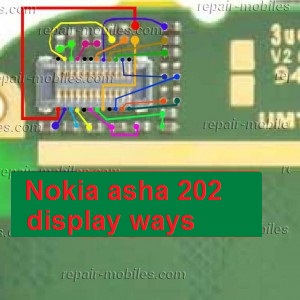
Nokia Asha 202 LCD Display Blink Jumper Solution

Friday, November 14, 2014
Nokia Asha 201 Ringer Speaker Problem Solution Ways Jumpers
If the ring tone problem in Nokia Asha 201 SOND quality is too low or poor voice quality in Ringer Nokia Asha 201 you can solve this problem easily with this schedule that is posted with this first step post.

in ringer to checked, so if it shows little or poor voice continuity put this ring as it does not show continuity ringer does not work and changing damage.after ringer ok you might not vote, these two main points ring is connected to the board control chart can be found in these two prints in red and blue lines on the Lcd lines.both two different paths.you should also check these links with the meter and if one of them is broken or damaged, you can easily can jumper, as defined in diagram.
for more detail and new tips and tricks about this problem keep visiting this page we will update it timely with new diagrams.some related post are also given bellow you can read them also for more information.
in ringer to checked, so if it shows little or poor voice continuity put this ring as it does not show continuity ringer does not work and changing damage.after ringer ok you might not vote, these two main points ring is connected to the board control chart can be found in these two prints in red and blue lines on the Lcd lines.both two different paths.you should also check these links with the meter and if one of them is broken or damaged, you can easily can jumper, as defined in diagram.
for more detail and new tips and tricks about this problem keep visiting this page we will update it timely with new diagrams.some related post are also given bellow you can read them also for more information.
Tuesday, November 11, 2014

Friday, November 7, 2014
Nokia Asha 200 Keypad Not Working Ic Jumper Problem Solution
In nokia asha 200 keypad problem can be due to rust carbon or water damage in this case keypad ic can be damage or keypad track can be missed from any point. for solving keypad problem in nokia asha 200 you can see diagram bellow.

In above diagram there are two main dial ic these are used for keypad functions and these are controlling keypad opetions.in upcoming days I will add a post about keypad track of nokia asha 200 that will also help you to see that which keys are linked with each other.
For this post you only can clean the board ic and keypad if there is some rust or carbon. you can resold these two parts and can replace these two ic for keypad problem in nokia asha 200.
In above diagram there are two main dial ic these are used for keypad functions and these are controlling keypad opetions.in upcoming days I will add a post about keypad track of nokia asha 200 that will also help you to see that which keys are linked with each other.
For this post you only can clean the board ic and keypad if there is some rust or carbon. you can resold these two parts and can replace these two ic for keypad problem in nokia asha 200.
Tuesday, November 4, 2014
Nokia Asha 200 Power Button On Off Switch Not Working Problem
if you have a Nokia Asha 200 dead they may can have a power switch on off problem so please in first step plug in a charger and if Nokia Asha 200 is charging proper and well but not getting on it means the main problem can be power switch on off fault.

so for this you have to change power switch button on off button in Nokia Asha 200 if prints are also damge in Nokia Asha 200 for on off button then here is a full path and track for power switch button in diagram that is attached with this post so check all this path and track for power switch on off button in Nokia Asha 200 and if any of these links broken than make these jumpers as shown in diagram with red line while blue color is indicated for ground print.
for more detail and new tips and tricks about this problem keep visiting this page we will update it timely with new diagrams.some related post are also given bellow you can read them also for more information.
so for this you have to change power switch button on off button in Nokia Asha 200 if prints are also damge in Nokia Asha 200 for on off button then here is a full path and track for power switch button in diagram that is attached with this post so check all this path and track for power switch on off button in Nokia Asha 200 and if any of these links broken than make these jumpers as shown in diagram with red line while blue color is indicated for ground print.
for more detail and new tips and tricks about this problem keep visiting this page we will update it timely with new diagrams.some related post are also given bellow you can read them also for more information.
Friday, October 31, 2014
Nokia Asha 311 Touch is not working problem Solution Jumper Ways
As we know Nokia Asha 311 have keypad and touch Lcd both.So if you are facing touch Lcd problem in Nokia Asha 311 it can be solve with a few steps that i am going to describe in this post.Look at the diagram bellow and follow steps that are given in it.
In above diagram you can see touch pad jack and a few different color lines in it. In first step try calibration to solve touch Lcd problem if touch Lcd touch positions are not correct.Nokia C5 Handsfree Headset problem solution ways

If touch Lcd is totally not working you can replace with new one and if replacement of touch Lcd is not working that can be problem of touch pad ways.
In above diagram you can see touch pad tracks so check all these paths with meter and if any of them is missing apply jumpers as given in repairing diagram for Nokia Asha 311 touch Lcd.
for more detail and new tips and tricks about cellphone service problem keep visiting this page we will update cellphone service diagrams timely with new cellphone diagrams.some related post are also given bellow you can read them also for more information about cellphone.
In above diagram you can see touch pad jack and a few different color lines in it. In first step try calibration to solve touch Lcd problem if touch Lcd touch positions are not correct.Nokia C5 Handsfree Headset problem solution ways

If touch Lcd is totally not working you can replace with new one and if replacement of touch Lcd is not working that can be problem of touch pad ways.
In above diagram you can see touch pad tracks so check all these paths with meter and if any of them is missing apply jumpers as given in repairing diagram for Nokia Asha 311 touch Lcd.
for more detail and new tips and tricks about cellphone service problem keep visiting this page we will update cellphone service diagrams timely with new cellphone diagrams.some related post are also given bellow you can read them also for more information about cellphone.
Saturday, October 18, 2014
Nokia Asha 202 Speaker Ear peace problem solution jumper ways
If you have speaker problem in nokia asha 202. Low ear peace voice. Noise in nokia asha 202 speaker ear peace. No voice during call in ear peace speaker. All these problems can be solve by following these tips and tricks that are given in this post.nokia c2-00 light problem solution jumpers Tested 100%

After dis assemble of nokia asha 202 replace ear peace speaker and check it again. If replacement of speaker can not solve the problem then you can check all these tracks that are given in above repairing diagram of nokia asha 202. If any component of these is missing or link is break you have to apply jumper.
Two different color lines are given in nokia asha 202 ear peace speaker diagram for solution. Small circles are given to identify points where you can apply jumpers in case of missing tracks or damage parts.
for more detail and new tips and tricks about cellphone service problem keep visiting this page we will update cellphone service diagrams timely with new cellphone diagrams.some related post are also given bellow you can read them also for more information about cellphone.
Read More..
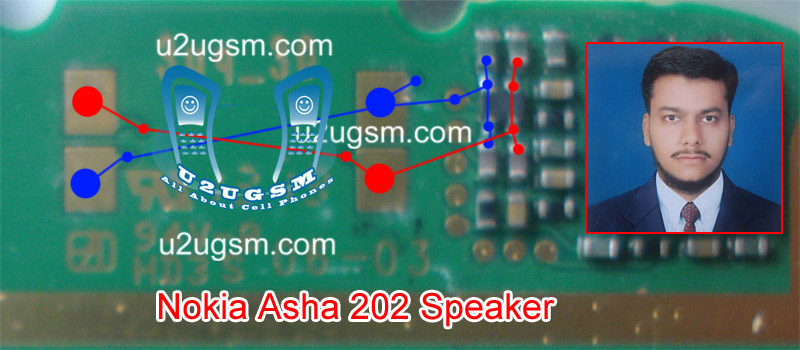
After dis assemble of nokia asha 202 replace ear peace speaker and check it again. If replacement of speaker can not solve the problem then you can check all these tracks that are given in above repairing diagram of nokia asha 202. If any component of these is missing or link is break you have to apply jumper.
Two different color lines are given in nokia asha 202 ear peace speaker diagram for solution. Small circles are given to identify points where you can apply jumpers in case of missing tracks or damage parts.
for more detail and new tips and tricks about cellphone service problem keep visiting this page we will update cellphone service diagrams timely with new cellphone diagrams.some related post are also given bellow you can read them also for more information about cellphone.
Thursday, September 25, 2014
Asha 311 Bluetooth FM Radio how to fix problem
Solution in the article is for Nokia Asha 311 Bluetooth and FM Radio problems. If you are having trouble activating Bluetooth or FM Radio in your phone make the solutions as shown in the diagram below.
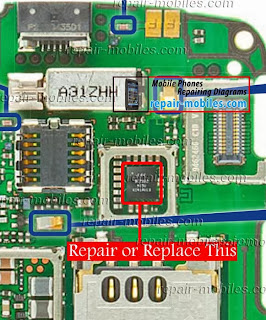
In Nokia Asha 311 Bluetooth problem do not occur that often if it does, I have marked Bluetooth IC in this diagram repair the marked IC if that does not work replace it with a new one.
Please Note that we will edit these solutions or add new ones if found in this page at any time in the future. So feel free to come back any time on this page to stay up to date.
If you have further Questions please dont hesitate to leave a comment.
Note: Every repairing solution posted here is tested by at least one member of our team. Use the information available here at Your Own Risk. We are not responsible if any harm comes to your device during the repairing process.
Friday, September 12, 2014
Nokia Asha 207 RM 954 version 04 06 Flash File Free Download
Free and Direct Download Latest version 04.06 flashing Firmware for Nokia Mobile Asha 207

Direct download nokia 207 MCU, PPM, CNT flash firmware version 04.06
Phone Name : Nokia Mobile 207Product Type : RM-954
Firmware Version : 04.06
Varian Name : RM-954 EURO_A2_BLACK_CYR_RUS_RU
Product Code : 059S781
File 01: rm954__04.06.mcusw
File 02: rm954__04.06.ppm_a2
File 03: rm954__04.06.image_a2_059S781
File 04: RM954_059S781_04.06_017_signature.bin
File 05: RM954_059S781_04.06_017.vpl
File 06: RM954_059S781_04.06_017.dcp
single link download link
Wednesday, August 20, 2014
Factory Reset Nokia Asha 305 to Restore Default Settings
Factory Reset Nokia Asha 305 to Restore Default Settings - Nokia Asha 305 has 3.0” TFT resistive touchscreen (240 x 400 pixels resolution) with Multitouch and measuring device. this can be a dual SIM (dual stand-by) smartphone with64 MB read-only storage and 32 MB RAM. For the storage, it includes 2 GB microSD card that may be upgraded up to 32 GB. The property options encompass Bluetooth v2.1 with EDR; and microUSB v2.0. youll additionally realize 2 MP camera with recording capability connected on the phone.

Reset Nokia Asha 305 to Restore Default Settings
If your phone is not working properly, you can reset some settings to their original values. To perform factory reset, do the following instructions:
- End all calls and connections.
- Select settings and restore factory sett. > settings only.
- Type in the security code*.
After restoring the original settings, your phone switches off and then on again. This may take longer than usual.
Note: * The default security code is 12345. If you forget the code and your phone is locked, your phone will require service.
Monday, August 18, 2014
Asha 305 Asha 306 Lights Ways how to fix problem
This solution is for Nokia Asha 305 and Nokia Asha 306 Led Lights Problem. It works on both of these phones despite their Sim Card differences.
Led lights problem can occur in these phones because of faulty display connector, so first of all make sure that moisture or carbon is not causing this problem by cleaning the display connector and general around it. In Nokia Asha 306 display connector leg No.12 and No.13 are for Led lights. I have marked their Ways in this diagram below.
Please Note that we will edit these solutions or add new ones if found in this page at any time in the future. So feel free to come back any time on this page to stay up to date.

If you have further Questions please dont hesitate to leave a comment.
Note: Every repairing solution posted here is tested by at least one member of our team. Use the information available here at Your Own Risk. We are not responsible if any harm comes to your device during the repairing process.
Saturday, August 16, 2014
Nokia asha 206 light problem jumper
This is a tricks of nokia asha 206 light problem repair without transistor and coil just using jumper.It is very easy solution.

Wednesday, August 13, 2014
Nokia Asha 501 RM 899 Latest Version 10 0 15 Flash File Free Download
Nokia Asha 501 RM-899 Update Flash File here Free Download Now

Phone Name : Nokia Asha 501
Product Type : RM-899
Firmware Version : 10.0.15
Variant Id : N/A
Varian Name : RM-899 NDT EURO EU2 B_GREEN NULL TR C
Product Code : 059S9P1
Product Type : RM-899
Firmware Version : 10.0.15
Variant Id : N/A
Varian Name : RM-899 NDT EURO EU2 B_GREEN NULL TR C
Product Code : 059S9P1
File Name : RM899_059S9P1_hwt_v012.bin
File Size : 212 bytes
File Name : RM899_SD_4GB_Empty.img_10.0.15.cardverref.xml
File Size : 269 bytes
File Name : RM899_059S9P1_ccc_v012.bin
File Size : 488 bytes
File Name : S40NG_simlock_3gstandard_bb5.bin
File Size : 964 bytes
File Name : DC_WP8_Template_S40_v4.bin
File Size : 1,05 Kb
File Name : RM899_059S9P1_10.0.15_012.spr
File Size : 1,12 Kb
File Name : RM899_059S9P1_10.0.15_012_signature.bin
File Size : 1,52 Kb
File Name : RM899_059S9P1_10.0.15_012.vpl
File Size : 4,63 Kb
File Name : P11349801dpi600_label_layout.xml
File Size : 4,73 Kb
File Name : P11349801dpi600.pcx
File Size : 12,65 Kb
File Name : RM899_059S9P1_10.0.15_012.dcp
File Size : 160,15 Kb
File Name : rm899_10.0.15_059S9P1_eu2.rofs.fpsx
File Size : 5,38 Mb
File Name : RM899_SD_4GB_Empty.img_10.0.15.fpsimage
File Size : 8,06 Mb
File Name : rm899_10.0.15_059S9P1_eu2.image.fpsx
File Size : 25,63 Mb
File Name : rm899_10.0.15.mcusw.fpsx
File Size : 28,18 Mb
File Size : 212 bytes
File Name : RM899_SD_4GB_Empty.img_10.0.15.cardverref.xml
File Size : 269 bytes
File Name : RM899_059S9P1_ccc_v012.bin
File Size : 488 bytes
File Name : S40NG_simlock_3gstandard_bb5.bin
File Size : 964 bytes
File Name : DC_WP8_Template_S40_v4.bin
File Size : 1,05 Kb
File Name : RM899_059S9P1_10.0.15_012.spr
File Size : 1,12 Kb
File Name : RM899_059S9P1_10.0.15_012_signature.bin
File Size : 1,52 Kb
File Name : RM899_059S9P1_10.0.15_012.vpl
File Size : 4,63 Kb
File Name : P11349801dpi600_label_layout.xml
File Size : 4,73 Kb
File Name : P11349801dpi600.pcx
File Size : 12,65 Kb
File Name : RM899_059S9P1_10.0.15_012.dcp
File Size : 160,15 Kb
File Name : rm899_10.0.15_059S9P1_eu2.rofs.fpsx
File Size : 5,38 Mb
File Name : RM899_SD_4GB_Empty.img_10.0.15.fpsimage
File Size : 8,06 Mb
File Name : rm899_10.0.15_059S9P1_eu2.image.fpsx
File Size : 25,63 Mb
File Name : rm899_10.0.15.mcusw.fpsx
File Size : 28,18 Mb
Subscribe to:
Posts (Atom)
