Showing posts with label bluetooth. Show all posts
Showing posts with label bluetooth. Show all posts
Thursday, October 30, 2014
Nokia C5 00 Bluetooth IC Not working problem solution
Nokia C5-00 bluetooh is not working problem can be solve with its Blutooth IC that is controlling the data transfer function in Nokia C5-00. If we can not connect bluetooth of Nokia C5-00 it means we are not able to transfer data via bluetooth in it nokia Asha 311 Touch is not working problem Solution Jumper Ways

The above repairing diagram will help you to find out parts that are used in bluetooth function.So find them and clean these parts with electronics cleaner.So that if there is some rust or carbon that can be clean.Apply hot air to dry it and do not apply much because it can be harm for your skin.
Reslod these parts and re flow them can solve bluetooth problem in Nokia C5-00. If it can not solve the issue then replace them to solve bluetooth problem in the Nokia Mobile phone.
for more detail and new tips and tricks about cellphone service problem keep visiting this page we will update cellphone service diagrams timely with new cellphone diagrams.some related post are also given bellow you can read them also for more information about cellphone.
The above repairing diagram will help you to find out parts that are used in bluetooth function.So find them and clean these parts with electronics cleaner.So that if there is some rust or carbon that can be clean.Apply hot air to dry it and do not apply much because it can be harm for your skin.
Reslod these parts and re flow them can solve bluetooth problem in Nokia C5-00. If it can not solve the issue then replace them to solve bluetooth problem in the Nokia Mobile phone.
for more detail and new tips and tricks about cellphone service problem keep visiting this page we will update cellphone service diagrams timely with new cellphone diagrams.some related post are also given bellow you can read them also for more information about cellphone.

Nokia X6 Bluetooth WLAN and GPS solution hardware repair solution
Bluetooth, Wireless LAN and GPS connection problem can be cause by a firmware failure and can be easily be fix by restoring, updating or flashing the phones firmware again. But after doing any firmware repair and the problem still exists the problem may certainly lies on the hardware components failures.
This solution below may possibly useful and help fix and repair Nokia X6 Bluetooth, WLAN and GPS problem issues for it shows the Bluetooh, WLAN and GPS component circuit.
 Repair Hints: Ensure that the firmware of the device is successfully calibrated, upgraded and restored.
1) Check all corresponding supply voltages in the circuit
2) Check the RF buffer clock feeds from the RF circuit
3) Check the Bluetooth and WLAN antenna
4) Rework the Bluetooth IC first, the WLAN will not work if the Bluetooth IC is faulty.
This solution below may possibly useful and help fix and repair Nokia X6 Bluetooth, WLAN and GPS problem issues for it shows the Bluetooh, WLAN and GPS component circuit.
Nokia X6 Bluetooth, Wireless LAN and GPS solution

1) Check all corresponding supply voltages in the circuit
2) Check the RF buffer clock feeds from the RF circuit
3) Check the Bluetooth and WLAN antenna
4) Rework the Bluetooth IC first, the WLAN will not work if the Bluetooth IC is faulty.
Thursday, September 25, 2014
Asha 311 Bluetooth FM Radio how to fix problem
Solution in the article is for Nokia Asha 311 Bluetooth and FM Radio problems. If you are having trouble activating Bluetooth or FM Radio in your phone make the solutions as shown in the diagram below.
In Nokia Asha 311 Bluetooth problem do not occur that often if it does, I have marked Bluetooth IC in this diagram repair the marked IC if that does not work replace it with a new one.
Please Note that we will edit these solutions or add new ones if found in this page at any time in the future. So feel free to come back any time on this page to stay up to date.
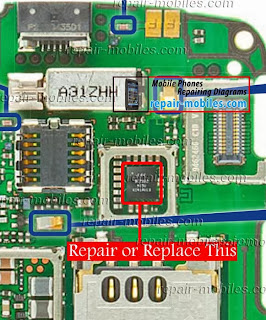
If you have further Questions please dont hesitate to leave a comment.
Note: Every repairing solution posted here is tested by at least one member of our team. Use the information available here at Your Own Risk. We are not responsible if any harm comes to your device during the repairing process.
Tuesday, September 23, 2014
5250 Bluetooth how to fix problem

phone's Bluetooth is not working diagram below can help you.
I have marked Bluetooth IC in the following diagram Repair or Replace
it with a new one. But before that clean the general area around it of
the motherboard with any cleaning liquid like Carbon Tetra
Chloride(CTC) to make sure that rust or moisture is not causing this
problem.
Please Note that we will edit these solutions or add new ones if found
in this page at any time in the future. So feel free to come back any
time on this page to stay up to date.
If you have further Questions please don't hesitate to leave a comment.
Note: Every repairing solution posted here is tested by at least one
member of our team. Use the information available here at Your Own
Risk. We are not responsible if any harm comes to your device during
the repairing process.
Subscribe to:
Posts (Atom)
