Showing posts with label problem. Show all posts
Showing posts with label problem. Show all posts
Sunday, December 7, 2014
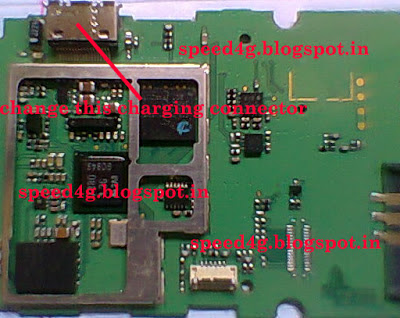
Repair Samsung C520 Not charging Problem Tested Solution

Repair Samsung C520 Not charging Problem Tested Solution

Monday, November 24, 2014
Nokia N73 On Off Button Problem
Nokia N73 is a Nokia phone that has a feature that is quite complete. The phone is also in great demand in the market that can easily be found in the hands of consumers.
Most problems that occur on the Nokia N73 is a disruption in the software, but it is also possible disturbances of the hardware also occur. One case of hardware malfunction Nokia N73 that I have ever found is the damage to the power button. There are several categories of damage in this section, but the worst is when the copper layer to attach the switch is broken. To overcome this we need a schematic diagram that is useful to guide us find the right path.
To get a schematic diagram of the Nokia N73, you can visit the site Schematic Diagram. There you can download various schematic diagram of mobile phones, especially Nokia. Here is a picture guide to repair damaged power button Nokia N73, please be stored.

Tuesday, November 18, 2014
Nokia 1100 Handfree Problem Solution By Jumpers
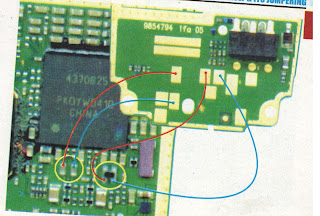
Nokia 1100 Handfree Problem Solution By Jumpers : Hardware Repairing Solution
Sunday, November 16, 2014
Nokia N97 White blue black or blank screen display problem solution
Heres a solution for Nokia N97 display problem hardware related issues that cant be fix by means of software.
This solution may possibly help fix and repair Nokia N97 LCD Lcd display problems such as white Lcd, blue Lcd, blank or black Lcd, garbled or saturated Lcd displays.If already tried to restore or flash the device firmware and or already tried installing a new replacement LCD Lcd module you may need to check the components showed on the solution below. There is a Display EMI filter mounted besides the LCD pin connector, you may check and trace the line paths from the pin connector before replacing a new replacement spare IC.
If the Display filter IC seems working or been replaced but the problem still exists you may proceed to rework or replace the Display Controller IC.
This solution may possibly help fix and repair Nokia N97 LCD Lcd display problems such as white Lcd, blue Lcd, blank or black Lcd, garbled or saturated Lcd displays.If already tried to restore or flash the device firmware and or already tried installing a new replacement LCD Lcd module you may need to check the components showed on the solution below.
Nokia N97 Display problem - hardware repair

If the Display filter IC seems working or been replaced but the problem still exists you may proceed to rework or replace the Display Controller IC.
Saturday, November 15, 2014
IPhone 4 error 2 problem solved 100 tested solution
I Phone 4 error 2 problem solved 100% tested solution if u have i phone 4 and u try this update this phone and set 50% update and display show only error 2 not update phone for this phone i have this problem 100% tested hardware solution see my solution many time tested me this solution try this
i done i phone 4 error 2 100% working repair solution here

work 100% done phone for error solution try this 1st try remove this parts not solved 2nd try change now 100% working im tested many time and dont forget visit my blog.
work 100% done phone for error solution try this 1st try remove this parts not solved 2nd try change now 100% working im tested many time and dont forget visit my blog.
Nokia 2710NE Memory Card Solution MicroSD Card not detected problem repair solution
When the MicroSD card inserted on the device and nothing happens but it displays "memory card not inserted" something like that, this solution may help fix and repair the problem if the Nokia 2710 navigation edition has been damaged by any means like wet damaged or accidentally dropped.
The solution below shows the particular SMD components that needs to check, trace and replace to possibly fix the problem.
 Repair tips:
1. Check the MMC card detection switch first, you can read a voltage on that area about 1.8 volts if unpressed and 0 volts if pressed.
2. Check and trace the MMC supply voltage it is marked with VSIOD and connected to MMC socket pin #4 then the pin #6 for groundings.
3. If both MMC power supply voltage and MMC detection switch is okay, the problem may lies on the ESD-EMI filter chip. Replace the ESD filter if necessarily.
The solution below shows the particular SMD components that needs to check, trace and replace to possibly fix the problem.
Nokia 2710ne MicroSD memory card problem solution

1. Check the MMC card detection switch first, you can read a voltage on that area about 1.8 volts if unpressed and 0 volts if pressed.
2. Check and trace the MMC supply voltage it is marked with VSIOD and connected to MMC socket pin #4 then the pin #6 for groundings.
3. If both MMC power supply voltage and MMC detection switch is okay, the problem may lies on the ESD-EMI filter chip. Replace the ESD filter if necessarily.
Friday, November 14, 2014
Nokia Asha 201 Ringer Speaker Problem Solution Ways Jumpers
If the ring tone problem in Nokia Asha 201 SOND quality is too low or poor voice quality in Ringer Nokia Asha 201 you can solve this problem easily with this schedule that is posted with this first step post.

in ringer to checked, so if it shows little or poor voice continuity put this ring as it does not show continuity ringer does not work and changing damage.after ringer ok you might not vote, these two main points ring is connected to the board control chart can be found in these two prints in red and blue lines on the Lcd lines.both two different paths.you should also check these links with the meter and if one of them is broken or damaged, you can easily can jumper, as defined in diagram.
for more detail and new tips and tricks about this problem keep visiting this page we will update it timely with new diagrams.some related post are also given bellow you can read them also for more information.
in ringer to checked, so if it shows little or poor voice continuity put this ring as it does not show continuity ringer does not work and changing damage.after ringer ok you might not vote, these two main points ring is connected to the board control chart can be found in these two prints in red and blue lines on the Lcd lines.both two different paths.you should also check these links with the meter and if one of them is broken or damaged, you can easily can jumper, as defined in diagram.
for more detail and new tips and tricks about this problem keep visiting this page we will update it timely with new diagrams.some related post are also given bellow you can read them also for more information.

Thursday, November 13, 2014
NOKIA 9300 BT PROBLEM SOLUTION
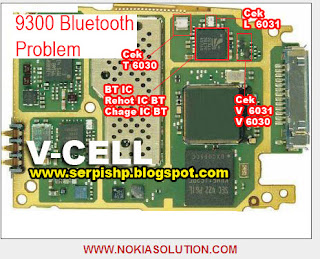
BLUETOOTH USE TO TRANSFER DATA FROM ANY CELL PHONE TO ANOTHER OR BETWEEN ANY OTHER BLUETOOTH BASED ELECTRONICS DEVICES. IF NOKIA 9300 FACE BT PROBLEM, AS A TECHNICIAN YOU CAN CHECK RED MARKED COMPONENT TO SOLVE THE BT PROBLEM.
Friday, November 7, 2014
Nokia E63 solution White blue and blank display problem solution
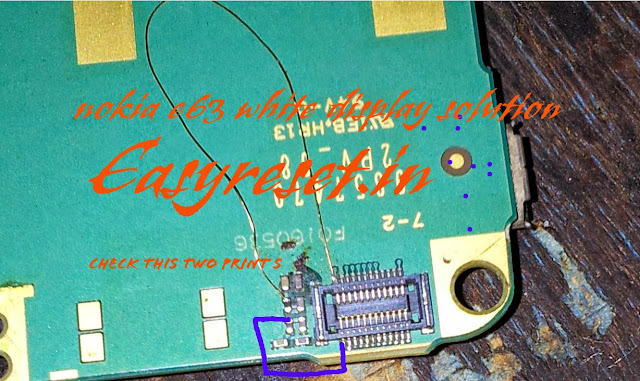
Check This two lines . If Path is brocken Make jumper . Not solve your problem Change display filter ic
Nokia Asha 200 Keypad Not Working Ic Jumper Problem Solution
In nokia asha 200 keypad problem can be due to rust carbon or water damage in this case keypad ic can be damage or keypad track can be missed from any point. for solving keypad problem in nokia asha 200 you can see diagram bellow.

In above diagram there are two main dial ic these are used for keypad functions and these are controlling keypad opetions.in upcoming days I will add a post about keypad track of nokia asha 200 that will also help you to see that which keys are linked with each other.
For this post you only can clean the board ic and keypad if there is some rust or carbon. you can resold these two parts and can replace these two ic for keypad problem in nokia asha 200.
In above diagram there are two main dial ic these are used for keypad functions and these are controlling keypad opetions.in upcoming days I will add a post about keypad track of nokia asha 200 that will also help you to see that which keys are linked with each other.
For this post you only can clean the board ic and keypad if there is some rust or carbon. you can resold these two parts and can replace these two ic for keypad problem in nokia asha 200.
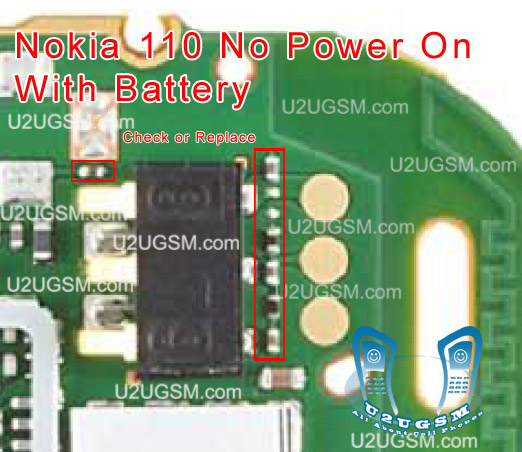
Nokia 111 No Power On with Battery Problem Solution
1-Nokia 111 is not getting power on with battery.
2-Nokia 111 is dead and not getting power on with battery.
3-But it can be switch on with direct power supply of 4v.

Tools:-
To solve this problem you should have
1-Any electronics cleaner.
2-Hot Air Machine.
3-Solding Iron.
4-And same mother board if a few components required.
Solution:-
1-Check Nokia 111 with new battery and try to switch on.
2-If it can not be power on with battery then check with Power Supply.
3-Disassamble Nokia 111 and look at mother board very carefully.
4-If there is some rust or carbon on board then clean it with electronics cleaner.
5-Apply hot air with Hot air gun. Here should not be much heat because it can harm you and Mobile
Phone.
6-Check Mobile phone with battery if it can be power on with it.
7-If not working with above process then change these parts as shown in above diagram.
Warnings:-
1-Do not apply to much heat it can be harm for your skin and mobile.
2-Do not apply to much cleaner it can be cause of rust or carbon if you do not make your phone dry.
for more detail and new tips and tricks about cellphone service problem keep visiting this page we will update daily this blog timely with other mobile solution.
2-Nokia 111 is dead and not getting power on with battery.
3-But it can be switch on with direct power supply of 4v.
Tools:-
To solve this problem you should have
1-Any electronics cleaner.
2-Hot Air Machine.
3-Solding Iron.
4-And same mother board if a few components required.
Solution:-
1-Check Nokia 111 with new battery and try to switch on.
2-If it can not be power on with battery then check with Power Supply.
3-Disassamble Nokia 111 and look at mother board very carefully.
4-If there is some rust or carbon on board then clean it with electronics cleaner.
5-Apply hot air with Hot air gun. Here should not be much heat because it can harm you and Mobile
Phone.
6-Check Mobile phone with battery if it can be power on with it.
7-If not working with above process then change these parts as shown in above diagram.
Warnings:-
1-Do not apply to much heat it can be harm for your skin and mobile.
2-Do not apply to much cleaner it can be cause of rust or carbon if you do not make your phone dry.
for more detail and new tips and tricks about cellphone service problem keep visiting this page we will update daily this blog timely with other mobile solution.
Thursday, November 6, 2014
LG 106B KEYPAD PROBLEM
Wednesday, November 5, 2014
Nokia C2 06 Charger Not Supported Problem Solution Ways
Plug in Charging pin into charging jack of Nokia C2-06 and if it shows an indication message Charger Not Supported it can be due to these few parts that are given bellow in diagram.So after disassemble of Nokia C2-06 clean these parts and area with electronics cleaner.

Apply hot air and make it dry.Resold these parts indicated with red lines in above diagram to solve Charger Not Supported in Nokia C2-06
You can take these parts from other models of nokia also to solve charging problem in nokia C2-06
Apply hot air and make it dry.Resold these parts indicated with red lines in above diagram to solve Charger Not Supported in Nokia C2-06
You can take these parts from other models of nokia also to solve charging problem in nokia C2-06
Nokia 110 No Power On with Battery Problem Solution
1-Nokia 110 is not getting power on with battery.
2-Nokia 110 is dead and not getting power on with battery.
3-But it can be switch on with direct power suplly of 4v.

Tools:-
To solve this problem you should have
1-Any electronics cleaner.
2-Hot Air Machine.
3-Solding Iron.
4-And same mother board if a few components required.
Solution:-
1-Check Nokia 110 with new battery and try to switch on.
2-If it can not be power on with battery then check with Power Supplu.
3-Disassamble Nokia 110 and look at mother board very carefully.
4-If there is some rust or carbon on board then clean it with electronics cleaner.
5-Apply hot air with Hot air gun. Here should not be much heat because it can harm you and Mobile
Phone.
6-Check Mobile phone with battery if it can be power on with it.
7-If not working with above process then change these parts as shown in above diagram.
Warnings:-
1-Do not apply to much heat it can be harm for your skin and mobile.
2-Do not apply to much cleaner it can be cause of rust or carbon if you do not make your phone dry.
for more detail and new tips and tricks about cellphone service problem keep visiting this page we will update daily this blog timely with other mobile solution.
2-Nokia 110 is dead and not getting power on with battery.
3-But it can be switch on with direct power suplly of 4v.

Tools:-
To solve this problem you should have
1-Any electronics cleaner.
2-Hot Air Machine.
3-Solding Iron.
4-And same mother board if a few components required.
Solution:-
1-Check Nokia 110 with new battery and try to switch on.
2-If it can not be power on with battery then check with Power Supplu.
3-Disassamble Nokia 110 and look at mother board very carefully.
4-If there is some rust or carbon on board then clean it with electronics cleaner.
5-Apply hot air with Hot air gun. Here should not be much heat because it can harm you and Mobile
Phone.
6-Check Mobile phone with battery if it can be power on with it.
7-If not working with above process then change these parts as shown in above diagram.
Warnings:-
1-Do not apply to much heat it can be harm for your skin and mobile.
2-Do not apply to much cleaner it can be cause of rust or carbon if you do not make your phone dry.
for more detail and new tips and tricks about cellphone service problem keep visiting this page we will update daily this blog timely with other mobile solution.
Nokia 2320 light problem solution keypad light lcd light
Nokia 2320 light problem can be due to water damages and carbon or rust.If you feel smell like burn rubber it may can be damages or components.Nokia 2320 light problem, lcd light problem, display light problem, led light problem, Keypad light problem.

all above problems can be solved with these parts that are in line with red color in above diagram.Clean all these parts with electronics cleaner and apply hot air to dry these parts.
Do not apply much heat because it can harm your skin or damage the mother board or its parts.In diagram you can see a light coil and three leg ic. divort and some resistances and caposters.Check all these and resold them.
If only re flow and re sold can not solve light problem we have to replace these parts.Keep reading i will post some more light solution for Nokia 2320 withoout these parts only with jumpers soon…
for more detail and new tips and tricks about cellphone service problem keep visiting this page we will update daily this blog timely with other mobile solution.some related post are also given bellow you can read them also for more information about cellphone
all above problems can be solved with these parts that are in line with red color in above diagram.Clean all these parts with electronics cleaner and apply hot air to dry these parts.
Do not apply much heat because it can harm your skin or damage the mother board or its parts.In diagram you can see a light coil and three leg ic. divort and some resistances and caposters.Check all these and resold them.
If only re flow and re sold can not solve light problem we have to replace these parts.Keep reading i will post some more light solution for Nokia 2320 withoout these parts only with jumpers soon…
for more detail and new tips and tricks about cellphone service problem keep visiting this page we will update daily this blog timely with other mobile solution.some related post are also given bellow you can read them also for more information about cellphone
Tuesday, November 4, 2014
Nokia Asha 200 Power Button On Off Switch Not Working Problem
if you have a Nokia Asha 200 dead they may can have a power switch on off problem so please in first step plug in a charger and if Nokia Asha 200 is charging proper and well but not getting on it means the main problem can be power switch on off fault.

so for this you have to change power switch button on off button in Nokia Asha 200 if prints are also damge in Nokia Asha 200 for on off button then here is a full path and track for power switch button in diagram that is attached with this post so check all this path and track for power switch on off button in Nokia Asha 200 and if any of these links broken than make these jumpers as shown in diagram with red line while blue color is indicated for ground print.
for more detail and new tips and tricks about this problem keep visiting this page we will update it timely with new diagrams.some related post are also given bellow you can read them also for more information.
so for this you have to change power switch button on off button in Nokia Asha 200 if prints are also damge in Nokia Asha 200 for on off button then here is a full path and track for power switch button in diagram that is attached with this post so check all this path and track for power switch on off button in Nokia Asha 200 and if any of these links broken than make these jumpers as shown in diagram with red line while blue color is indicated for ground print.
for more detail and new tips and tricks about this problem keep visiting this page we will update it timely with new diagrams.some related post are also given bellow you can read them also for more information.
nokia 105 white lcd light problem
nokia 105 white lcd light problem nokia 105 white display solution nokia 105 white display 105 white lcd solution nokia 105 lcd whit display aolution nokia c101 white display solution nokia 105 white lcd solution nokia 105 black lcd solution Nokia 105 white Lcd problem 105 display solution nokia 105 lcd white display.

here is a diagram that will solve display problem in nokia 103 you can see all the links in diagram that goes to board from lcd jack.check all these prints and tracks with electronics meter and if any of them is broken make jumpers as shown.all these links are indicated with different colors so that can be identified easily.
here is a diagram that will solve display problem in nokia 103 you can see all the links in diagram that goes to board from lcd jack.check all these prints and tracks with electronics meter and if any of them is broken make jumpers as shown.all these links are indicated with different colors so that can be identified easily.
Monday, November 3, 2014
Nokia C2 03 Camera Standby Notworkin Problem Solution Jumper Ways
Nokia C2-03 Camera Problem, Nokia C2-03 Camera Standby Mode can be cause of water damage or breakage. To solve this problem in the mobile phone you can follow a few steps that i am going to describe in this post.

In first step restore factory setting in Nokia C2-03. Then make a full flash (software firmware) installation. And the third step is to check hardware diagnostings. After dis assambly of phone check the whole mother board carefully.If there is some rust or carbon on board then clean it with electronics cleaner and apply some heat with hot air. So that the mother board can be dry.
If mother board can not be full dry it can create carbon in future so keep in mind it should be dry.Do not apply much heat as it can harm your skin and mother board of cell phone.
In above diagram as you can see there are different color lines. These lines are indicating tracks that are used in camera function so check these paths and apply jumpers as shown in above diagram.
for more detail and new tips and tricks about cellphone service problem keep visiting this page we will update cellphone service diagrams timely with new cellphone diagrams.some related post are also given bellow you can read them also for more information about cellphone.
Read More..
In first step restore factory setting in Nokia C2-03. Then make a full flash (software firmware) installation. And the third step is to check hardware diagnostings. After dis assambly of phone check the whole mother board carefully.If there is some rust or carbon on board then clean it with electronics cleaner and apply some heat with hot air. So that the mother board can be dry.
If mother board can not be full dry it can create carbon in future so keep in mind it should be dry.Do not apply much heat as it can harm your skin and mother board of cell phone.
In above diagram as you can see there are different color lines. These lines are indicating tracks that are used in camera function so check these paths and apply jumpers as shown in above diagram.
for more detail and new tips and tricks about cellphone service problem keep visiting this page we will update cellphone service diagrams timely with new cellphone diagrams.some related post are also given bellow you can read them also for more information about cellphone.
Friday, October 31, 2014
Nokia Asha 311 Touch is not working problem Solution Jumper Ways
As we know Nokia Asha 311 have keypad and touch Lcd both.So if you are facing touch Lcd problem in Nokia Asha 311 it can be solve with a few steps that i am going to describe in this post.Look at the diagram bellow and follow steps that are given in it.
In above diagram you can see touch pad jack and a few different color lines in it. In first step try calibration to solve touch Lcd problem if touch Lcd touch positions are not correct.Nokia C5 Handsfree Headset problem solution ways

If touch Lcd is totally not working you can replace with new one and if replacement of touch Lcd is not working that can be problem of touch pad ways.
In above diagram you can see touch pad tracks so check all these paths with meter and if any of them is missing apply jumpers as given in repairing diagram for Nokia Asha 311 touch Lcd.
for more detail and new tips and tricks about cellphone service problem keep visiting this page we will update cellphone service diagrams timely with new cellphone diagrams.some related post are also given bellow you can read them also for more information about cellphone.
In above diagram you can see touch pad jack and a few different color lines in it. In first step try calibration to solve touch Lcd problem if touch Lcd touch positions are not correct.Nokia C5 Handsfree Headset problem solution ways

If touch Lcd is totally not working you can replace with new one and if replacement of touch Lcd is not working that can be problem of touch pad ways.
In above diagram you can see touch pad tracks so check all these paths with meter and if any of them is missing apply jumpers as given in repairing diagram for Nokia Asha 311 touch Lcd.
for more detail and new tips and tricks about cellphone service problem keep visiting this page we will update cellphone service diagrams timely with new cellphone diagrams.some related post are also given bellow you can read them also for more information about cellphone.
Subscribe to:
Posts (Atom)
