Showing posts with label working. Show all posts
Showing posts with label working. Show all posts
Thursday, November 20, 2014
Nokia 2600 classic keypad ways track Keypad is not working solution

Nokia 2600 classic keypad ways track Keypad is not working solution

Thursday, November 13, 2014
Blackberry 9900 microphone not working
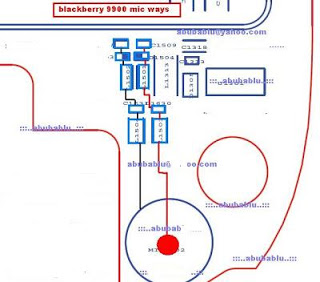
Blackberry 9900 microphone not working Solution
blackberry 9900 microphone problems
blackberry 9900 microphone replacement ways
Friday, November 7, 2014
Nokia Asha 200 Keypad Not Working Ic Jumper Problem Solution
In nokia asha 200 keypad problem can be due to rust carbon or water damage in this case keypad ic can be damage or keypad track can be missed from any point. for solving keypad problem in nokia asha 200 you can see diagram bellow.

In above diagram there are two main dial ic these are used for keypad functions and these are controlling keypad opetions.in upcoming days I will add a post about keypad track of nokia asha 200 that will also help you to see that which keys are linked with each other.
For this post you only can clean the board ic and keypad if there is some rust or carbon. you can resold these two parts and can replace these two ic for keypad problem in nokia asha 200.
Tuesday, November 4, 2014
Nokia Asha 200 Power Button On Off Switch Not Working Problem
if you have a Nokia Asha 200 dead they may can have a power switch on off problem so please in first step plug in a charger and if Nokia Asha 200 is charging proper and well but not getting on it means the main problem can be power switch on off fault.

so for this you have to change power switch button on off button in Nokia Asha 200 if prints are also damge in Nokia Asha 200 for on off button then here is a full path and track for power switch button in diagram that is attached with this post so check all this path and track for power switch on off button in Nokia Asha 200 and if any of these links broken than make these jumpers as shown in diagram with red line while blue color is indicated for ground print.
for more detail and new tips and tricks about this problem keep visiting this page we will update it timely with new diagrams.some related post are also given bellow you can read them also for more information.
Friday, October 31, 2014
Nokia Asha 311 Touch is not working problem Solution Jumper Ways
As we know Nokia Asha 311 have keypad and touch Lcd both.So if you are facing touch Lcd problem in Nokia Asha 311 it can be solve with a few steps that i am going to describe in this post.Look at the diagram bellow and follow steps that are given in it.
In above diagram you can see touch pad jack and a few different color lines in it. In first step try calibration to solve touch Lcd problem if touch Lcd touch positions are not correct.Nokia C5 Handsfree Headset problem solution ways

If touch Lcd is totally not working you can replace with new one and if replacement of touch Lcd is not working that can be problem of touch pad ways.
In above diagram you can see touch pad tracks so check all these paths with meter and if any of them is missing apply jumpers as given in repairing diagram for Nokia Asha 311 touch Lcd.
for more detail and new tips and tricks about cellphone service problem keep visiting this page we will update cellphone service diagrams timely with new cellphone diagrams.some related post are also given bellow you can read them also for more information about cellphone.
Thursday, October 30, 2014
Nokia C5 00 Bluetooth IC Not working problem solution
Nokia C5-00 bluetooh is not working problem can be solve with its Blutooth IC that is controlling the data transfer function in Nokia C5-00. If we can not connect bluetooth of Nokia C5-00 it means we are not able to transfer data via bluetooth in it nokia Asha 311 Touch is not working problem Solution Jumper Ways

The above repairing diagram will help you to find out parts that are used in bluetooth function.So find them and clean these parts with electronics cleaner.So that if there is some rust or carbon that can be clean.Apply hot air to dry it and do not apply much because it can be harm for your skin.
Reslod these parts and re flow them can solve bluetooth problem in Nokia C5-00. If it can not solve the issue then replace them to solve bluetooth problem in the Nokia Mobile phone.
for more detail and new tips and tricks about cellphone service problem keep visiting this page we will update cellphone service diagrams timely with new cellphone diagrams.some related post are also given bellow you can read them also for more information about cellphone.
Wednesday, October 15, 2014
nokia 101 speaker not working solution
nokia 101 speaker not working problem can be cause of water damages. It may can be due to damage and burn parts.In repairing diagram bellow some parts and tracks are identified. All these path and parts are used in Speaker function of nokia 101.
![nokia]()
Both red and blue color lines are showing tracks to solve nokia 101 speaker ear peace problem. check all these points and if any of these path is missing apply jumpers as shown in above speaker repairing diagram for nokia 101.
Both red and blue color lines are showing tracks to solve nokia 101 speaker ear peace problem. check all these points and if any of these path is missing apply jumpers as shown in above speaker repairing diagram for nokia 101.
Thursday, October 2, 2014
Saturday, September 6, 2014
Samsung Galaxy S3 Not Working Download mode Option Solution

Wednesday, September 3, 2014

Monday, August 25, 2014


Friday, August 22, 2014

Tuesday, August 19, 2014
Nokia 6710 navigator Not Working Upper Keypad Solution
Nokia 6710 navigator Not Working Upper Keypad Solution

Saturday, August 16, 2014

Tuesday, August 12, 2014
Nokia 5530 Keypad Not Working Problem fix problem
Nokia Mobile 5530 Xpress music keypad Problem solution.


Saturday, August 9, 2014
Working 100 WOOTEL W 500 Flash File DOWNLOAD
Hardware version:CA05
Software version:0101
CPU TYPE:6252
Internal version:8B00
Boot downloading complete!
Flash ID: 00EF0040
Flash Type: SF_W25Q16CV
Chip Capacity: 0x200000(2MB)
HONGYU52_10A_GEMINI16_PCB01_GSM_MT6252_S01.A105A3P _WT03_BA02_120725

DOWNLOAD
Read More..
Software version:0101
CPU TYPE:6252
Internal version:8B00
Boot downloading complete!
Flash ID: 00EF0040
Flash Type: SF_W25Q16CV
Chip Capacity: 0x200000(2MB)
HONGYU52_10A_GEMINI16_PCB01_GSM_MT6252_S01.A105A3P _WT03_BA02_120725
DOWNLOAD
Subscribe to:
Posts (Atom)
