Showing posts with label no. Show all posts
Showing posts with label no. Show all posts
Monday, November 17, 2014
Nokia 5610 Earpiece Speaker No Audio Sound Solution
Heres a solution that may help repair nokia 5610 xpressmusic earpiece speaker no audio sound output problem.
If ever tried and replace the speaker but the problem still there is no sound can be heard over the earpiece speaker on nokia 5610, the problem may lies on a faulty flex cable wire.
This solution shows the components that may need to check or replace before attempting to change or replace the flex cable, this components is composed of a filter coil and an ESD protection component.

Repair hints:
1. Ensure that the speaker is working or try to replace a new one.
2. Check the components showed on the solution above, replace if found damaged
3. Replace the flex cable wire
Read More..
If ever tried and replace the speaker but the problem still there is no sound can be heard over the earpiece speaker on nokia 5610, the problem may lies on a faulty flex cable wire.
This solution shows the components that may need to check or replace before attempting to change or replace the flex cable, this components is composed of a filter coil and an ESD protection component.
Nokia 5610 Xpressmusic Earpiece Speaker problem Solution

Repair hints:
1. Ensure that the speaker is working or try to replace a new one.
2. Check the components showed on the solution above, replace if found damaged
3. Replace the flex cable wire

Sunday, November 16, 2014
nokia 5320xm Ringer and Hands Free Speaker No sound solution
This is the solution for nokia 5320 xpressmusic Ringer and hands free speaker failed to have an audio sounds output when the hands free mode is activated and or no ringtones can be heard. The solution below shows the location of particular components that needs to be check or then by replace if found damaged or faulty.
 After ensuring that the speaker is working okay but the problem still exists, locate the corresponding components showed on the solution above, these components are filter coils. You may need to rework the audio IC (AVILMA) for further deeper troubleshhoting and also by tracing the each earpiece line paths from the avilma solder ball bumps across to each filter coils and to the earpiece speaker terminal pads.
Nokia 5320 ringer, hands free speaker failure solution

Saturday, November 15, 2014

Sunday, November 9, 2014
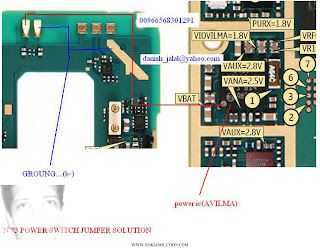
NOKIA N73 NO POWER
Friday, November 7, 2014
Nokia 111 No Power On with Battery Problem Solution
1-Nokia 111 is not getting power on with battery.
2-Nokia 111 is dead and not getting power on with battery.
3-But it can be switch on with direct power supply of 4v.

Tools:-
To solve this problem you should have
1-Any electronics cleaner.
2-Hot Air Machine.
3-Solding Iron.
4-And same mother board if a few components required.
Solution:-
1-Check Nokia 111 with new battery and try to switch on.
2-If it can not be power on with battery then check with Power Supply.
3-Disassamble Nokia 111 and look at mother board very carefully.
4-If there is some rust or carbon on board then clean it with electronics cleaner.
5-Apply hot air with Hot air gun. Here should not be much heat because it can harm you and Mobile
Phone.
6-Check Mobile phone with battery if it can be power on with it.
7-If not working with above process then change these parts as shown in above diagram.
Warnings:-
1-Do not apply to much heat it can be harm for your skin and mobile.
2-Do not apply to much cleaner it can be cause of rust or carbon if you do not make your phone dry.
for more detail and new tips and tricks about cellphone service problem keep visiting this page we will update daily this blog timely with other mobile solution.
2-Nokia 111 is dead and not getting power on with battery.
3-But it can be switch on with direct power supply of 4v.
Tools:-
To solve this problem you should have
1-Any electronics cleaner.
2-Hot Air Machine.
3-Solding Iron.
4-And same mother board if a few components required.
Solution:-
1-Check Nokia 111 with new battery and try to switch on.
2-If it can not be power on with battery then check with Power Supply.
3-Disassamble Nokia 111 and look at mother board very carefully.
4-If there is some rust or carbon on board then clean it with electronics cleaner.
5-Apply hot air with Hot air gun. Here should not be much heat because it can harm you and Mobile
Phone.
6-Check Mobile phone with battery if it can be power on with it.
7-If not working with above process then change these parts as shown in above diagram.
Warnings:-
1-Do not apply to much heat it can be harm for your skin and mobile.
2-Do not apply to much cleaner it can be cause of rust or carbon if you do not make your phone dry.
for more detail and new tips and tricks about cellphone service problem keep visiting this page we will update daily this blog timely with other mobile solution.
Wednesday, November 5, 2014
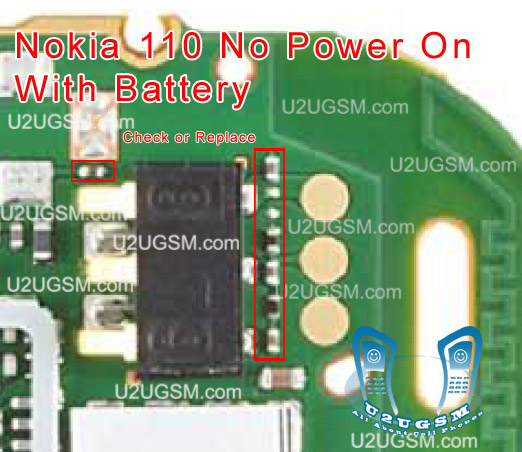
Nokia 110 No Power On with Battery Problem Solution
1-Nokia 110 is not getting power on with battery.
2-Nokia 110 is dead and not getting power on with battery.
3-But it can be switch on with direct power suplly of 4v.

Tools:-
To solve this problem you should have
1-Any electronics cleaner.
2-Hot Air Machine.
3-Solding Iron.
4-And same mother board if a few components required.
Solution:-
1-Check Nokia 110 with new battery and try to switch on.
2-If it can not be power on with battery then check with Power Supplu.
3-Disassamble Nokia 110 and look at mother board very carefully.
4-If there is some rust or carbon on board then clean it with electronics cleaner.
5-Apply hot air with Hot air gun. Here should not be much heat because it can harm you and Mobile
Phone.
6-Check Mobile phone with battery if it can be power on with it.
7-If not working with above process then change these parts as shown in above diagram.
Warnings:-
1-Do not apply to much heat it can be harm for your skin and mobile.
2-Do not apply to much cleaner it can be cause of rust or carbon if you do not make your phone dry.
for more detail and new tips and tricks about cellphone service problem keep visiting this page we will update daily this blog timely with other mobile solution.
2-Nokia 110 is dead and not getting power on with battery.
3-But it can be switch on with direct power suplly of 4v.

Tools:-
To solve this problem you should have
1-Any electronics cleaner.
2-Hot Air Machine.
3-Solding Iron.
4-And same mother board if a few components required.
Solution:-
1-Check Nokia 110 with new battery and try to switch on.
2-If it can not be power on with battery then check with Power Supplu.
3-Disassamble Nokia 110 and look at mother board very carefully.
4-If there is some rust or carbon on board then clean it with electronics cleaner.
5-Apply hot air with Hot air gun. Here should not be much heat because it can harm you and Mobile
Phone.
6-Check Mobile phone with battery if it can be power on with it.
7-If not working with above process then change these parts as shown in above diagram.
Warnings:-
1-Do not apply to much heat it can be harm for your skin and mobile.
2-Do not apply to much cleaner it can be cause of rust or carbon if you do not make your phone dry.
for more detail and new tips and tricks about cellphone service problem keep visiting this page we will update daily this blog timely with other mobile solution.
Sunday, September 7, 2014
iPhone 3G Grayed No Wifi Solution
In my case i have tried to restore,downgrade firmware & no result
then i installed iRecovery program it showed that problem not soft
ware but hardware here step by step photos what i made


then i installed iRecovery program it showed that problem not soft
ware but hardware here step by step photos what i made


Tested By Me.3G Grayed no wifi second hardware solution

Subscribe to:
Posts (Atom)
