Showing posts with label jumper. Show all posts
Showing posts with label jumper. Show all posts
Thursday, November 20, 2014
Nokia 114 110 Lcd Jumper Solution

Nokia 110 Display Track ways
Nokia 114 Display Track ways
Nokia 114 Lcd Jumper Solution
Nokia 114 White Display Problem
Nokia 110 Lcd Jumper Solution
Having nokia 114 White Display Problem, I have marked display ways jumper points in this diagram. Only make these jumpers if necessary like if any of the prints are busted. If the LCD connector is in good shape replace the LCD itself.
Tested By musharraf Ali
Your Own Risk we are not responsible if these solutions may cause any harm to your Device.

Wednesday, November 19, 2014
Samsung E250 Limited Service Local Mode Contact Service Jumper Solution

Samsung E250 Limited Service Local Mode Contact Service Jumper Solution
Monday, November 17, 2014
Nokia Asha 202 LCD Display Blink Jumper Solution
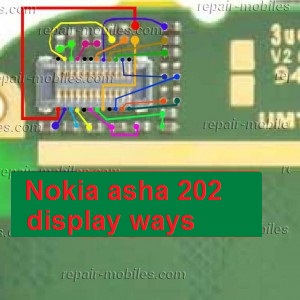
Nokia Asha 202 LCD Display Blink Jumper Solution
Saturday, November 8, 2014
Nokia 2700 classic Power ON OFF Key Solution Switch button jumper ways solution
Heres the solution that may help fix and repair Nokia 2700 classic Power problem. This solution is for Nokia 2700 classic that shows charging indication but doesnt get On or power up when pressing the power key switch button. Although this solution came late but still there are many who are looking and requesting this solution.
 There is line test spots near the Keypad filter IC that can be easily check the power/ end key line paths, just apply a jumper wire if that line is open or cut.
If the said line spots is okay, you may need to check and replace the upper Keypad Filter IC.
Nokia 2700C Power On -Off key Switch Line Tracks

If the said line spots is okay, you may need to check and replace the upper Keypad Filter IC.
Friday, November 7, 2014
Nokia Asha 200 Keypad Not Working Ic Jumper Problem Solution
In nokia asha 200 keypad problem can be due to rust carbon or water damage in this case keypad ic can be damage or keypad track can be missed from any point. for solving keypad problem in nokia asha 200 you can see diagram bellow.

In above diagram there are two main dial ic these are used for keypad functions and these are controlling keypad opetions.in upcoming days I will add a post about keypad track of nokia asha 200 that will also help you to see that which keys are linked with each other.
For this post you only can clean the board ic and keypad if there is some rust or carbon. you can resold these two parts and can replace these two ic for keypad problem in nokia asha 200.
In above diagram there are two main dial ic these are used for keypad functions and these are controlling keypad opetions.in upcoming days I will add a post about keypad track of nokia asha 200 that will also help you to see that which keys are linked with each other.
For this post you only can clean the board ic and keypad if there is some rust or carbon. you can resold these two parts and can replace these two ic for keypad problem in nokia asha 200.
Monday, November 3, 2014
Nokia C2 03 Camera Standby Notworkin Problem Solution Jumper Ways
Nokia C2-03 Camera Problem, Nokia C2-03 Camera Standby Mode can be cause of water damage or breakage. To solve this problem in the mobile phone you can follow a few steps that i am going to describe in this post.

In first step restore factory setting in Nokia C2-03. Then make a full flash (software firmware) installation. And the third step is to check hardware diagnostings. After dis assambly of phone check the whole mother board carefully.If there is some rust or carbon on board then clean it with electronics cleaner and apply some heat with hot air. So that the mother board can be dry.
If mother board can not be full dry it can create carbon in future so keep in mind it should be dry.Do not apply much heat as it can harm your skin and mother board of cell phone.
In above diagram as you can see there are different color lines. These lines are indicating tracks that are used in camera function so check these paths and apply jumpers as shown in above diagram.
for more detail and new tips and tricks about cellphone service problem keep visiting this page we will update cellphone service diagrams timely with new cellphone diagrams.some related post are also given bellow you can read them also for more information about cellphone.
Read More..
In first step restore factory setting in Nokia C2-03. Then make a full flash (software firmware) installation. And the third step is to check hardware diagnostings. After dis assambly of phone check the whole mother board carefully.If there is some rust or carbon on board then clean it with electronics cleaner and apply some heat with hot air. So that the mother board can be dry.
If mother board can not be full dry it can create carbon in future so keep in mind it should be dry.Do not apply much heat as it can harm your skin and mother board of cell phone.
In above diagram as you can see there are different color lines. These lines are indicating tracks that are used in camera function so check these paths and apply jumpers as shown in above diagram.
for more detail and new tips and tricks about cellphone service problem keep visiting this page we will update cellphone service diagrams timely with new cellphone diagrams.some related post are also given bellow you can read them also for more information about cellphone.
Friday, October 31, 2014
Nokia Asha 311 Touch is not working problem Solution Jumper Ways
As we know Nokia Asha 311 have keypad and touch Lcd both.So if you are facing touch Lcd problem in Nokia Asha 311 it can be solve with a few steps that i am going to describe in this post.Look at the diagram bellow and follow steps that are given in it.
In above diagram you can see touch pad jack and a few different color lines in it. In first step try calibration to solve touch Lcd problem if touch Lcd touch positions are not correct.Nokia C5 Handsfree Headset problem solution ways

If touch Lcd is totally not working you can replace with new one and if replacement of touch Lcd is not working that can be problem of touch pad ways.
In above diagram you can see touch pad tracks so check all these paths with meter and if any of them is missing apply jumpers as given in repairing diagram for Nokia Asha 311 touch Lcd.
for more detail and new tips and tricks about cellphone service problem keep visiting this page we will update cellphone service diagrams timely with new cellphone diagrams.some related post are also given bellow you can read them also for more information about cellphone.
In above diagram you can see touch pad jack and a few different color lines in it. In first step try calibration to solve touch Lcd problem if touch Lcd touch positions are not correct.Nokia C5 Handsfree Headset problem solution ways

If touch Lcd is totally not working you can replace with new one and if replacement of touch Lcd is not working that can be problem of touch pad ways.
In above diagram you can see touch pad tracks so check all these paths with meter and if any of them is missing apply jumpers as given in repairing diagram for Nokia Asha 311 touch Lcd.
for more detail and new tips and tricks about cellphone service problem keep visiting this page we will update cellphone service diagrams timely with new cellphone diagrams.some related post are also given bellow you can read them also for more information about cellphone.
Monday, October 27, 2014
Nokia 1280 ON OFF Power Key Jumper Ways
Heres a full solution for a damaged Nokia 1280 ON and OFF key problem. This problem may result to unable the device to turns on but it shows charging indication when the battery charger is being plug-in.
The solution below shows the entire Nokia 1280 ON/OF key connection tracks which can be used for easy troubleshooting.

If the Nokia 1280 On-Off key may not working, you can trace its connection line paths as shown on solution above. Just apply a jumper wire if the line tracks is open or cut.
The solution below shows the entire Nokia 1280 ON/OF key connection tracks which can be used for easy troubleshooting.
Nokia 1280 On-Off Jumper Ways and Line Tracks

If the Nokia 1280 On-Off key may not working, you can trace its connection line paths as shown on solution above. Just apply a jumper wire if the line tracks is open or cut.
Sunday, October 26, 2014
Nokia E90 Mic microphone solution Jumper Ways and Tracks solution
Heres the solution for Nokia E90 (MIC) microphone or mouthpiece problem. This solution shows the connection line paths that needs to check or can be used as a guide where to put or apply a jumper wire if the microphones PCB terminal solder pads is already lifted or missing.
If encountered these problem on nokia e90, you may need to replace the Digimic module (digital microphone).
But before that you may first check and trace the microphones supply voltage and clock line paths.
The solution below shows the particular spots or components where to start or check these corresponding connections on Nokia E90 microphones circuit

Just follow the spots where to check and test the microphones supply voltage and audio clock signal is is feeds from the power and audio IC (Avilma), the microphones data signal is feed to the application processor(RAPIDO).
If all the line paths is all okay you may then proceed in replacing the digital microphone module.
If encountered these problem on nokia e90, you may need to replace the Digimic module (digital microphone).
But before that you may first check and trace the microphones supply voltage and clock line paths.
The solution below shows the particular spots or components where to start or check these corresponding connections on Nokia E90 microphones circuit
Nokia E90 Mic, mrophone or mouthpiece repair solution

Just follow the spots where to check and test the microphones supply voltage and audio clock signal is is feeds from the power and audio IC (Avilma), the microphones data signal is feed to the application processor(RAPIDO).
If all the line paths is all okay you may then proceed in replacing the digital microphone module.
Saturday, October 18, 2014
Nokia E63 insert sim problem and solution

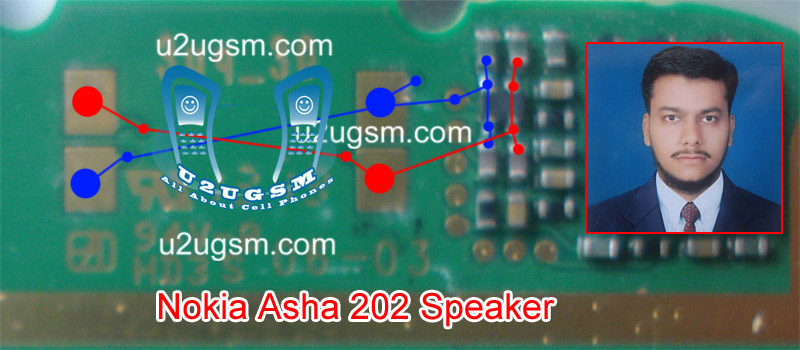
Nokia Asha 202 Speaker Ear peace problem solution jumper ways
If you have speaker problem in nokia asha 202. Low ear peace voice. Noise in nokia asha 202 speaker ear peace. No voice during call in ear peace speaker. All these problems can be solve by following these tips and tricks that are given in this post.nokia c2-00 light problem solution jumpers Tested 100%

After dis assemble of nokia asha 202 replace ear peace speaker and check it again. If replacement of speaker can not solve the problem then you can check all these tracks that are given in above repairing diagram of nokia asha 202. If any component of these is missing or link is break you have to apply jumper.
Two different color lines are given in nokia asha 202 ear peace speaker diagram for solution. Small circles are given to identify points where you can apply jumpers in case of missing tracks or damage parts.
for more detail and new tips and tricks about cellphone service problem keep visiting this page we will update cellphone service diagrams timely with new cellphone diagrams.some related post are also given bellow you can read them also for more information about cellphone.
Read More..
After dis assemble of nokia asha 202 replace ear peace speaker and check it again. If replacement of speaker can not solve the problem then you can check all these tracks that are given in above repairing diagram of nokia asha 202. If any component of these is missing or link is break you have to apply jumper.
Two different color lines are given in nokia asha 202 ear peace speaker diagram for solution. Small circles are given to identify points where you can apply jumpers in case of missing tracks or damage parts.
for more detail and new tips and tricks about cellphone service problem keep visiting this page we will update cellphone service diagrams timely with new cellphone diagrams.some related post are also given bellow you can read them also for more information about cellphone.
Friday, October 17, 2014
Nokia X2 05 Mic problem solution jumper ways
If mic is not working in Nokia X2-05. Microphone solution with jumpers, Low voice of Nokia X2-05 mic problem solution, Nokia X2-02 mic jumpers to make it solve.Nokia X2-05 Speaker problem solution jumper ways

If mic is not working or have a low voice it can be fault of mic and housing. Check Nokia X2-05 housing ( body ). All housing have a small whole at the point of mic. In some cases rust or dust cover this point and the voice can not reach proper to the mic point so make it clean if there is some dust on it.
After disassambly of Nokia X2-05 look at the motherboard for rust carbon or burren parts. If you found some rust or carbon apply electronics cleaner on the mother board and apply hot air to make it dry proper.
Applying too much heat can damage the mother board and parts.It also can be harm for your skin.So keep in mind about normal heat flow when making it dry.
Remove mic and check all these tracks that are provided in above diagram to solve mic problem in Nokia X2-05. In diagram two different color lines are given to identify all parts that are used to solve Nokia X2-05 mic problem with jumpers.
If some parts are missing or damage apply jumper on these points where small circles are pointing in nokia mic repairing diagram above.
If mic is not working or have a low voice it can be fault of mic and housing. Check Nokia X2-05 housing ( body ). All housing have a small whole at the point of mic. In some cases rust or dust cover this point and the voice can not reach proper to the mic point so make it clean if there is some dust on it.
After disassambly of Nokia X2-05 look at the motherboard for rust carbon or burren parts. If you found some rust or carbon apply electronics cleaner on the mother board and apply hot air to make it dry proper.
Applying too much heat can damage the mother board and parts.It also can be harm for your skin.So keep in mind about normal heat flow when making it dry.
Remove mic and check all these tracks that are provided in above diagram to solve mic problem in Nokia X2-05. In diagram two different color lines are given to identify all parts that are used to solve Nokia X2-05 mic problem with jumpers.
If some parts are missing or damage apply jumper on these points where small circles are pointing in nokia mic repairing diagram above.
Thursday, October 2, 2014
Wednesday, September 24, 2014
Nokia c1 01 lcd light jumper solution
This is nokia c1-01 lecd light problem solution with apply jumper.if you have available parts of nokia c1-01 lcd light part then you repair this problem with replacing parts. If you have no light transistor only then you use this jumper
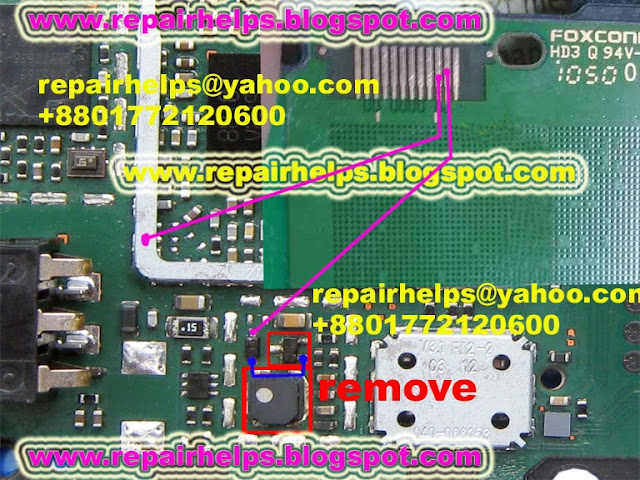
How to repair it : Remove lcd light transistor and coil make blue jumper and make pink color two jumper.
Sunday, September 21, 2014

Saturday, September 20, 2014
Nokia c1 complete light solution with jumper tasted
c1 complete light solution with jumper tasted 100%

Monday, September 15, 2014
Nokia 6600s Sim card not accepted Problem New Jumper Solution
Nokia 6600s Sim card not accepted solution.
![Nokia]()
Read More..

Sunday, September 14, 2014

Saturday, September 13, 2014
Nokia 5530 On of Power Switch Ways Jumper Solution 100 Tested
Nokia 5530 Xpress music power switch Not Working Solution 100% Tested


Nokia c1 01 power button ways jumper
If your nokia c1-01 phone is charging ok but phone not on then you repair your phone using this solution or if you see broken power button line.This is only power button ways just check power button ande make this jumper.

How to do this work: If you face this problem then first open button sticker and clean power button.after that check your phone if problem still then check power button ways if you get broken any line then make jumper following this solution.
you may also like :
Nokia 1661 power button ways
Nokia 1200 power button ways
Nokia 1800 power button ways
How to do this work: If you face this problem then first open button sticker and clean power button.after that check your phone if problem still then check power button ways if you get broken any line then make jumper following this solution.
you may also like :
Nokia 1661 power button ways
Nokia 1200 power button ways
Nokia 1800 power button ways
Subscribe to:
Posts (Atom)
